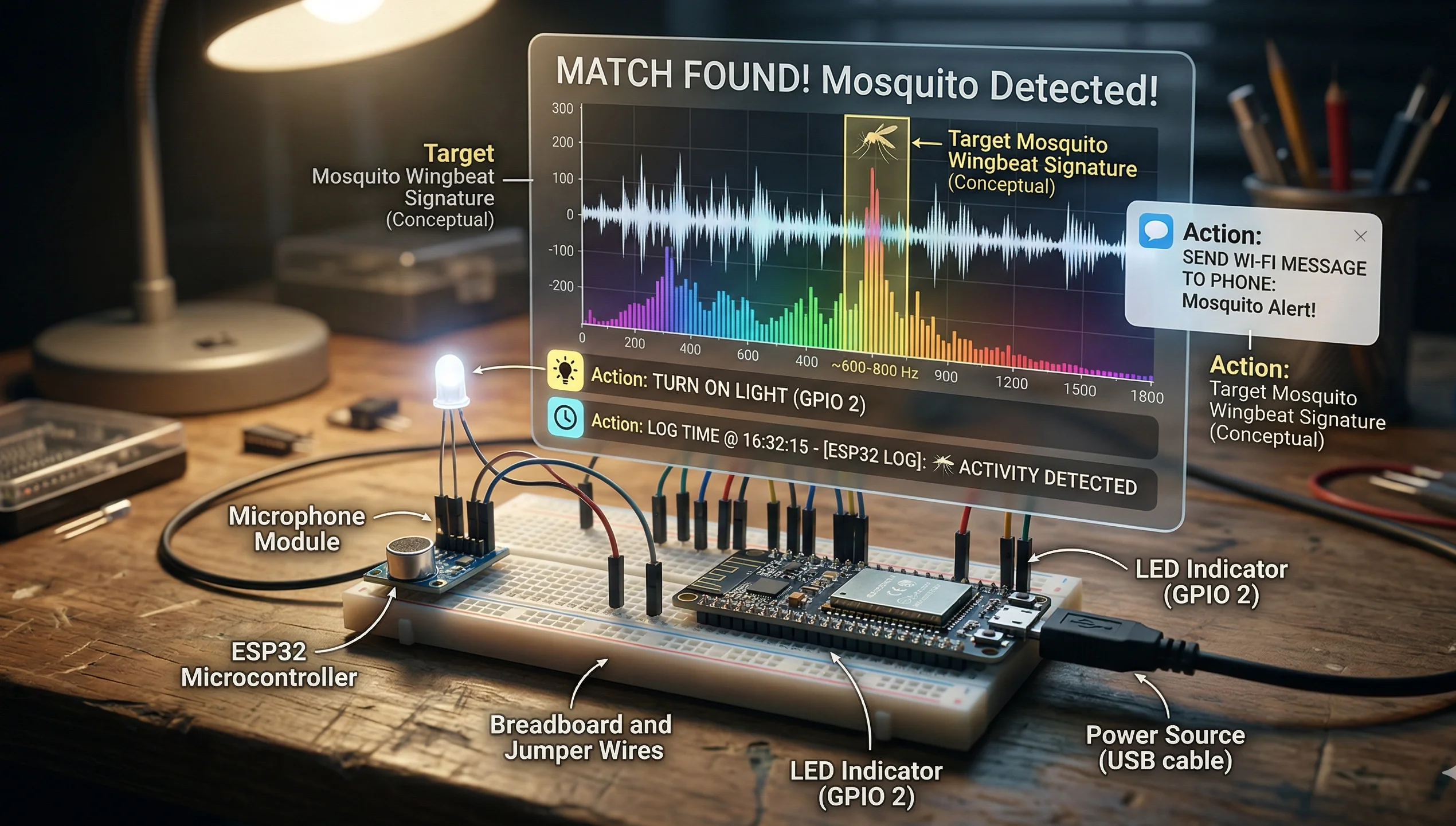
Let's talk about the ESP Mosquito Project. If you're new to electronics or IoT (Internet of Things), this is a great place to start. The project is about using a small, affordable computer chip called an ESP to build a device that can detect mosquitoes.
Think of it like a tiny, smart trap. Instead of just catching bugs, it can listen for the specific buzzing sound a mosquito makes. When it hears that sound, it can send you an alert or log the data. This helps people monitor mosquito activity, which is useful for health and research.
Handy Tools For You
How Does It Work?
The core idea is pretty clever. A mosquito's wings beat at a very high frequency when it flies, creating a unique high-pitched sound. The project uses a microphone connected to the ESP board to pick up this sound.
The ESP chip is the brain. It runs a small program that analyzes the audio from the microphone. It's trained to recognize the mosquito's buzz from other background noises. When a match is found, the ESP can take action—like turning on a light, making a note of the time, or even sending a message to your phone over Wi-Fi.
What You'll Need to Build One
- An ESP32 or ESP8266 Board: These are the main microcontroller boards that have built-in Wi-Fi. They're like the project's brain and communicator.
- A Microphone Module: A small electronic component that can capture sound. You'll connect this to the ESP board.
- Power Source: A USB cable or a battery pack to keep it running.
- Some Basic Code: The instructions (software) that tell the ESP what to do. Don't worry, you can find ready-to-use examples.
- A Breadboard and Jumper Wires (optional): These help you connect everything together neatly without soldering.
Getting Started with the Code
Here’s a very simple example to show you the structure of the code you might use. This isn't the complete program, but it shows you how the setup might look.
// Include necessary libraries
#include

// Define the pin for the microphone
const int micPin = 34;

void setup() {
  // Start communication with your computer
  Serial.begin(115200);
  // Set the microphone pin to read input
  pinMode(micPin, INPUT);
  Serial.println("Mosquito detector is ready...");
}

void loop() {
  // Read the sound level from the microphone
  int soundValue = analogRead(micPin);

  // A simple check (real detection is more complex!)
  if(soundValue > 500) {
    Serial.println("Potential mosquito buzz detected!");
    // Here you could add code to trigger an action
  }
  delay(100); // Wait a bit before checking again
}
This basic code just checks if a sound is loud. A real project would use more advanced signal processing to identify the mosquito's specific pitch. You can use our online text editor to play with and modify code snippets.
Why This Project Matters
This isn't just a cool tech experiment. Mosquitoes spread diseases like malaria, dengue, and Zika. By building a network of these low-cost detectors, communities or researchers can get real-time data on where mosquitoes are active. This helps in targeting control efforts more effectively and keeping people safer.
It's also a fantastic way to learn. You get hands-on experience with sensors, microcontrollers, and basic data logging—skills that are the foundation of many IoT projects.
Frequently Asked Questions
📚 Read Next




Do I need to be an expert to start this project?
Not at all! This is a beginner-friendly project. If you know how to connect a few wires and upload code to a board, you're good to go. There are many helpful guides and communities online.
Can it differentiate between a mosquito and a fly?
Yes, that's the goal. A basic version might just detect buzzing. But with more advanced programming (using libraries for audio frequency analysis), you can train it to recognize the specific wing-beat frequency of a mosquito, which is different from a housefly's.
What can I do with the data it collects?
You can log it to a simple file, send it to a free cloud service, or even display it on a small screen. For a bigger project, you could use the data to create a map of mosquito activity in your area. Tools like a CSV editor can help you manage the collected data.




