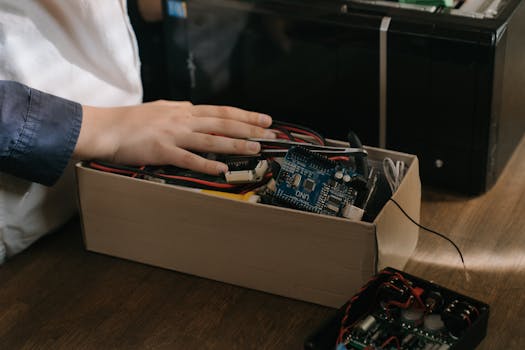
Arduino UNO represents the perfect entry point into the world of electronics and embedded systems programming. This comprehensive guide will walk you through everything you need to know to start creating your own interactive projects with this versatile microcontroller board.
Getting Started with Arduino UNO
The Arduino UNO is an open-source microcontroller board based on the ATmega328P chip. It features 14 digital input/output pins, 6 analog inputs, a 16 MHz quartz crystal, USB connection, power jack, and everything needed to support the microcontroller. What makes Arduino particularly appealing to beginners is its simplified programming environment and extensive community support.
Handy Tools For You
Essential Setup Requirements
Before diving into programming, you'll need to gather the necessary components. The Arduino UNO board itself, a USB Type-B cable for connection, and a computer with available USB ports are the basic requirements. For your first projects, consider adding an LED, resistors, and a breadboard to experiment with basic circuits.
Installing the Arduino IDE
The Arduino Integrated Development Environment (IDE) is where you'll write, compile, and upload your code to the board. Available for Windows, Mac, and Linux, the IDE provides a straightforward interface that simplifies the programming process for beginners while offering advanced features for experienced developers.
void setup() {
  // Initialize digital pin LED_BUILTIN as output
  pinMode(LED_BUILTIN, OUTPUT);
}

void loop() {
  digitalWrite(LED_BUILTIN, HIGH);   // Turn LED on
  delay(1000);                       // Wait for 1 second
  digitalWrite(LED_BUILTIN, LOW);    // Turn LED off
  delay(1000);                       // Wait for 1 second
}
Your First Arduino Program
The classic "Blink" program serves as the perfect introduction to Arduino programming. This simple sketch demonstrates fundamental concepts like pin configuration, digital output, and timing delays. After uploading this code, the built-in LED on your Arduino UNO will blink continuously at one-second intervals.
Understanding Arduino Programming Structure
Every Arduino program consists of two essential functions: setup() and loop(). The setup() function runs once when the board powers up or resets, used for initializing variables and pin modes. The loop() function runs continuously after setup() completes, containing the main program logic that repeats indefinitely.
// Basic Arduino Program Structure
void setup() {
  // Put your setup code here, runs once
  pinMode(13, OUTPUT);  // Set pin 13 as output
}

void loop() {
  // Put your main code here, runs repeatedly
  digitalWrite(13, HIGH);
  delay(500);
  digitalWrite(13, LOW);
  delay(500);
}
Connecting and Uploading Your First Sketch
Connect your Arduino UNO to your computer using the USB cable. The board should power on, and an LED will light up. In the Arduino IDE, select "Tools" → "Board" → "Arduino UNO" and choose the correct serial port under "Tools" → "Port." Click the upload button (right arrow icon) to compile and transfer your code to the board.
Expanding Your Skills
Once you've mastered basic blinking, explore more advanced concepts like reading analog sensors, controlling servos, using interrupts, and communicating with other devices via I2C or SPI. The Arduino community offers thousands of libraries and example codes to help you implement complex functionality with minimal effort.
// Reading analog sensor values
int sensorPin = A0;    // Select analog input pin
int sensorValue = 0;   // Variable to store sensor value

void setup() {
  Serial.begin(9600);  // Initialize serial communication
}

void loop() {
  sensorValue = analogRead(sensorPin);  // Read sensor value
  Serial.println(sensorValue);          // Print value to serial monitor
  delay(100);                           // Short delay
}
Next Steps and Project Ideas
After grasping the fundamentals, challenge yourself with practical projects. Start with simple applications like temperature sensors, light-controlled LEDs, or basic robots. Gradually progress to more complex systems like home automation, weather stations, or interactive art installations. The Arduino platform's versatility ensures endless possibilities for creative expression and practical problem-solving.
Frequently Asked Questions
📚 Read Next




What programming language does Arduino use?
Arduino uses a simplified version of C++ with additional libraries specifically designed for microcontroller programming. The language includes built-in functions for common tasks like digital I/O, analog reading, and timing operations.
Do I need prior programming experience to use Arduino?
No prior programming experience is necessary. Arduino was designed specifically for beginners, with extensive documentation, example codes, and a supportive community. Basic concepts can be learned quickly, and complexity can be added gradually as skills develop.
How do I power my Arduino UNO board?
The Arduino UNO can be powered through the USB connection from your computer or an external power supply (7-12V DC) connected to the power jack. For portable projects, you can use batteries with appropriate voltage regulators.
What's the difference between digital and analog pins?
Digital pins can read or write only two states: HIGH (5V) or LOW (0V). Analog pins can read variable voltage levels (0-5V) with 10-bit resolution (0-1023 values) and some can also function as analog outputs using PWM (Pulse Width Modulation).
Can I use Arduino UNO for commercial projects?
Yes, Arduino is open-source hardware, meaning you can use it in commercial applications. However, if you plan to manufacture your own boards based on Arduino designs, you must respect the open-source licenses and properly attribute the original Arduino team.




