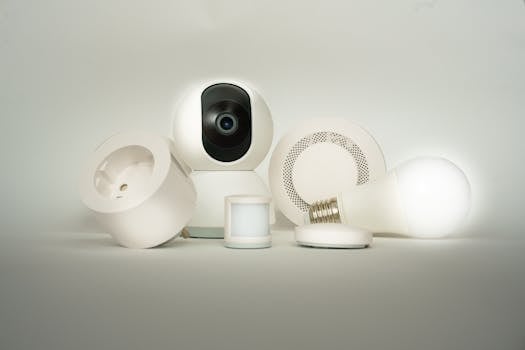
Thinking of setting up a home automation system for your 2BHK flat in India? It can feel a bit overwhelming at first, but it's simpler than you might think. Let's break it down into easy steps, talk about what it might cost, and share some practical tips to get you started.
What is Home Automation, Really?
At its core, home automation is about giving your home simple instructions. You can tell your lights to turn off from your bed, set your AC to cool the room before you get back, or have your coffee maker start brewing in the morning. It's about small conveniences that add up to make daily life smoother.
Handy Tools For You
A Simple Plan to Get Started
You don't need to automate everything at once. Starting small is the smart way to go. Here’s a simple, phased approach:
Phase 1: The Basics (The "Easy Wins")
Begin with devices that are easy to install and give you immediate control. This is where you see the magic happen without a big investment.
- Smart Plugs: Turn any regular appliance (like a fan, lamp, or geyser) into a smart one. You can control it with your phone or set schedules.
- Smart Bulbs: Control lights, change colors, and set moods without touching a switch. Great for living rooms and bedrooms.
- Smart Door Lock: Lock/unlock your door with a code or your phone. No more worrying about lost keys.
Phase 2: Comfort & Security
Once you're comfortable, add devices that increase your comfort and peace of mind.
- Smart AC Controller or Smart Fan: Control your air conditioner or fan remotely. Set it to turn on before you get home on a hot day.
- Smart Camera/Doorbell: Keep an eye on your home from anywhere. Get alerts when someone is at the door.
- Smart Sensors: Use motion sensors to turn on lights automatically or water leak sensors to prevent damage.
Phase 3: Bringing It All Together
This is where you connect different devices to work together, often called "scenes" or "routines."
- "Good Morning" Routine: With one command, your blinds open, lights turn on softly, and the geyser starts.
- "Movie Time" Scene: Lights dim, the AC sets to a comfortable temperature, and your TV turns on.
To create these, you'll use a central hub (like from Amazon Alexa or Google Home) or a smart home app that supports all your devices.
Understanding the Costs for a 2BHK
Costs can vary widely based on brand and features. Here’s a rough estimate to give you an idea:
| Device Type | Approximate Cost Range (per device) | Notes |
|---|---|---|
| Smart Bulb | ₹ 800 - ₹ 2,500 | Basic white vs. multi-color options. |
| Smart Plug | ₹ 900 - ₹ 1,800 | Look for energy monitoring features. |
| Smart Door Lock | ₹ 8,000 - ₹ 20,000+ | Fingerprint, code, and app-based models available. |
| Smart AC Controller | ₹ 2,500 - ₹ 5,000 | Makes your existing AC smart. |
| Smart Camera | ₹ 2,000 - ₹ 6,000 | Indoor/outdoor options with cloud storage plans. |
| Smart Hub/Speaker | ₹ 4,000 - ₹ 10,000 | Needed for voice control and advanced automations. |
Total Estimated Starting Cost (Phase 1): For a basic setup with 4-5 smart bulbs, 2-3 smart plugs, and a hub, you could be looking at ₹ 10,000 to ₹ 20,000.
Professional Installation: If you're not DIY-inclined, factor in another ₹ 3,000 - ₹ 10,000 for an electrician or technician to set things up neatly and safely.
Important Tips Before You Buy
- Check Your Wi-Fi: Most smart devices need a stable 2.4GHz Wi-Fi network. Make sure your router can handle a few more devices.
- Stick to One Ecosystem: Try to buy devices that work with either Google Assistant, Amazon Alexa, or Apple HomeKit. Mixing too many different apps can get confusing. Our Multi Tools page can help you manage different tech tasks.
- Read Reviews for Indian Conditions: Look for reviews that mention performance during power cuts, voltage fluctuations, and with Indian mobile networks.
- Start with a Single Brand Kit: Many brands offer starter kits (like a bulb, plug, and hub combo). It's often cheaper and ensures compatibility.
- Think About Privacy: Understand what data the devices collect. Opt for brands with good privacy policies and local data servers if possible.
A Simple Automation Example
Let's say you want your porch light to turn on at sunset and off at sunrise. Here’s the general idea of how you'd set it up in an app:
IF (Time is Sunset)
THEN (Turn ON Porch Light)

IF (Time is Sunrise)
THEN (Turn OFF Porch Light)
You don't write code; you just tap these options in your smart home app. It's that simple!
For more on planning and calculations, check out our Compound Interest Calculator to see how savings from energy-efficient devices add up, or our Percentage Calculator for budgeting.
Frequently Asked Questions
📚 Read Next




Will home automation work during a power cut?
Most smart devices need power to function. If the mains power goes out, they will turn off. However, if you have an inverter or UPS for your Wi-Fi router, some devices might remain controllable if they were on before the cut, but this is not guaranteed. Smart locks with physical key backups are a good idea for this reason.
Is a smart hub necessary?
For basic control via your phone app, a hub is often not needed. However, if you want to use voice commands (with Alexa or Google Assistant), create automations between different brands of devices, or have your automations work locally without the internet, then a dedicated smart hub is very useful.
Can I install these devices myself?
Absolutely! Devices like smart plugs, bulbs, cameras, and smart speakers are designed for DIY installation—just plug them in and follow the app instructions. For devices that need wiring (like smart switches, ceiling fan controllers, or door locks), it's safer and recommended to hire a qualified electrician.
What's the ongoing cost after buying the devices?
The main ongoing costs are electricity for the devices (which is minimal) and potential subscription fees. Some security cameras or advanced services may require a monthly cloud storage plan to save video history. Always check if a device has optional paid services before buying.
Setting up a smart home is a fun project. Start with one or two devices you'll use daily, get comfortable with them, and then slowly build your system. Before you know it, you'll be living in your very own futuristic flat!
For other helpful tools for your home and projects, explore all our utilities on the Porexo Tools page.




