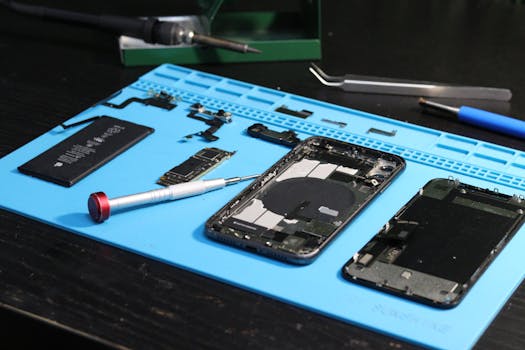
Starting out with mobile phone repair can feel a bit overwhelming. The small parts and delicate circuits need careful handling. The most important first step is getting the right tools. Using the correct tools makes the job safer, easier, and prevents you from accidentally damaging the phone.
Think of it like a surgeon needs precise instruments. For phone repair, you need a small, dedicated set of tools. Here’s a breakdown of the basic tools you should have, why they matter, and how to use them.
Handy Tools For You
The Basic Toolkit for Beginners
You don't need a huge, expensive kit to begin. Focus on these core items that cover most common repair tasks like opening the phone, removing screws, and handling small connectors.
1. Precision Screwdriver Set
Phone screws are tiny and come in different shapes (like Phillips #000, Pentalobe, Torx T3/T4). A good set has multiple interchangeable bits. Using the wrong size can strip the screw head, making it impossible to remove.
Tip: Look for a set with a magnetic tip. It helps hold onto those tiny screws so they don't get lost. A popular and reliable brand to start with is iFixit's driver kits.
2. Plastic Opening Tools (Pry Tools)
These are thin, flat tools made of plastic or nylon. Their main job is to safely separate the phone's case or screen from the frame without scratching or cracking it. Metal tools can damage the plastic clips and short-circuit the board.
Tip: They often come in a set of different shapes and thicknesses. Start with a medium-sized flat one.
3. Tweezers
You'll use tweezers to pick up and place small screws, connectors, and components. Curved or angled tips provide better visibility and grip. Anti-static tweezers are best as they prevent static electricity from harming sensitive electronics.
4. Suction Cup
This simple tool is crucial for lifting screens, especially on modern phones where the screen is glued to the frame. You stick it firmly on the glass, pull up to create a gap, and then slide in your plastic opening tool.
5. Spudger Tool
A spudger is a multi-purpose tool, usually with a plastic wedge on one end and a pointed pick on the other. It's used for prying, pushing, and disconnecting ribbon cables. The non-conductive material is safe to use around electronics.
Organizing Your Workspace
Keeping your screws and parts organized is half the battle. A simple magnetic mat or a compartment tray will save you from confusion. Here's a simple way to track parts if you're just starting:
// Simple Method for Organizing a Repair
1. Clear a clean, well-lit table.
2. Use a small container or magnetic mat for screws.
3. Group screws by where they came from (e.g., "bottom casing", "battery bracket").
4. Take a photo with your phone before disconnecting any cable.
5. Place removed parts in order from left to right as you take them out.
Safety Note: Always disconnect the battery as the very first step after opening the phone, if possible. This prevents short circuits. Refer to a repair guide for your specific phone model before starting.
Where to Buy and Learn More
You can find starter kits online on Amazon, eBay, or specialty stores like iFixit. For learning, websites like iFixit and YouTube channels like Jessa's (iPad Rehab) or Louis Rossmann offer excellent free tutorials on repair basics and logic board troubleshooting.
Start with a simple battery or screen replacement on an old phone you don't mind practicing on. With these basic tools and some patience, you'll be able to handle many common phone problems yourself.
Frequently Asked Questions
📚 Read Next




Can I use regular screwdrivers from a hardware store for phone repair?
No, it's not recommended. Regular screwdrivers are too large and lack the precision needed for tiny phone screws. Using them will likely strip the screw heads. You need a precision set with bits specifically sized for electronics (like Phillips #00, Pentalobe, Torx T3-T6).
Why can't I use a metal knife or blade to open my phone?
Metal tools are hard and sharp. They can easily scratch the phone's casing, crack the glass or plastic screen, and, most dangerously, slip and puncture the battery or short-circuit the motherboard. Plastic tools are flexible and non-conductive, making them much safer for the job.
What is the one tool I shouldn't skip as a complete beginner?
The plastic opening tool (pry tool) is the most critical for a first repair. It allows you to open the phone without causing the most common and costly damage—cracked screens and broken case clips. A set of precision screwdrivers is a very close second.
Do I need a heat gun or hair dryer for repairs?
For many modern phones with glued components (like batteries or screens), yes, a heat source is often necessary. A regular hair dryer on a low/medium setting can work in a pinch to soften the adhesive. For frequent repairs, a dedicated low-temperature heating pad is safer and more controlled.